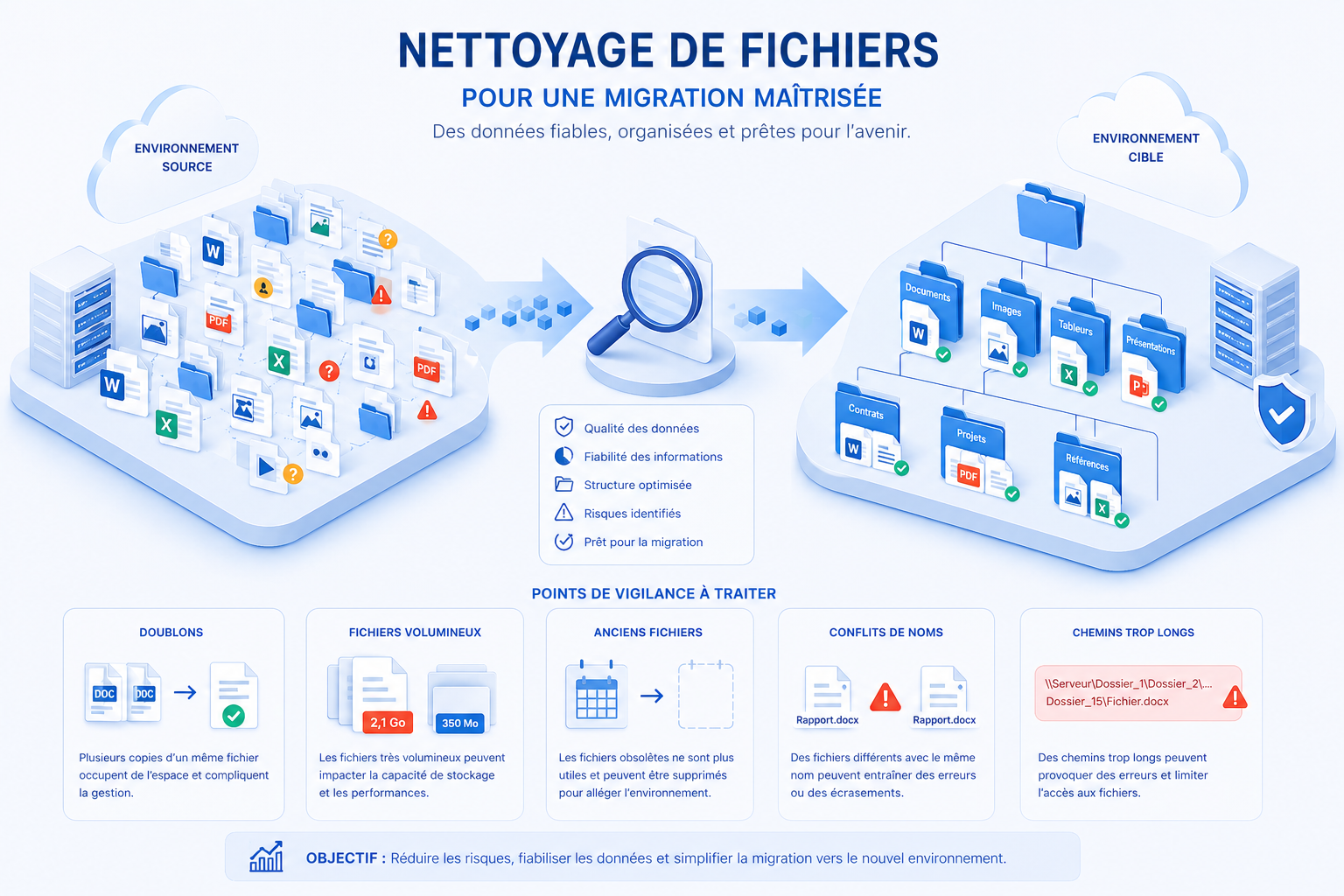
Between duplicates, old versions, forgotten archives and documents never used again, most IT systems end up holding a large amount of useless data.
Cleaning up isn’t just about tidiness. It’s a concrete way to improve performance, cut costs and simplify everyday work. And contrary to popular belief, you don’t need to wait for a migration project or a change of provider to get started — even if those moments remain excellent opportunities.
A quiet problem, but a very real one
Over time, data piles up without any real control:
- Duplicate documents
- Multiple versions kept “just in case”
- Forgotten archives
- Files never opened
- Obsolete formats
This clutter builds up gradually and silently. Until it starts slowing everything else down.
The consequences
- Rising storage costs
- Harder to find information
- Systems that are more complex to maintain
- Greater risks (security, compliance)
And the longer you wait, the bigger the clean-up.
Worth doing… at any time
Some situations make cleaning up more obvious: a migration, a change of tools, a reorganisation. In those cases, cleaning up helps to:
- Reduce the volumes to process
- Speed up projects
- Avoid moving useless data
- Limit errors
But these shouldn’t be the only times to act. Cleaning up regularly keeps your IT system healthy, without the need for massive, costly operations.
Where to start?
This is often where things get stuck. Faced with thousands — even millions — of files, it’s hard to know what to delete, what to keep, and on what basis. To meet this need, Async has developed an analysis tool that quickly identifies low-value files. The goal: a clear picture for simple, effective decisions.
What the tool identifies
Trivial files
Very small files containing little information and often of no real use.
Large files
Useless archives, old programs or huge exports taking up space.
Unused files
Files that haven’t been opened in years.
Duplicates
Identical files detected, even when they have different names.
Name conflicts
Files with the same name but different content, a potential source of errors.
Paths too long
Can cause problems during transfers or in some tools.
Rare formats
Uncommon formats, sometimes hard to use or maintain.
Immediate benefits
A well-run clean-up quickly lets you:
- Reduce storage volumes
- Make data easier to read
- Find information faster
- Simplify environments
- Limit risks
And above all, take back control.
In conclusion
File clutter never goes away on its own: it accumulates. Waiting for an external constraint before acting often just postpones the problem. Starting a clean-up — even a gradual one — improves your IT system for the long term. Migration or not, the conclusion is the same: less useless data means more efficiency.
Interested in a spring clean?
Then why not start right now?
Read next
All news →

Chemin de Paudex 5
1132 Lully · Switzerland
 © 2026 ASYNC IT SÀRL — ALL RIGHTS RESERVED