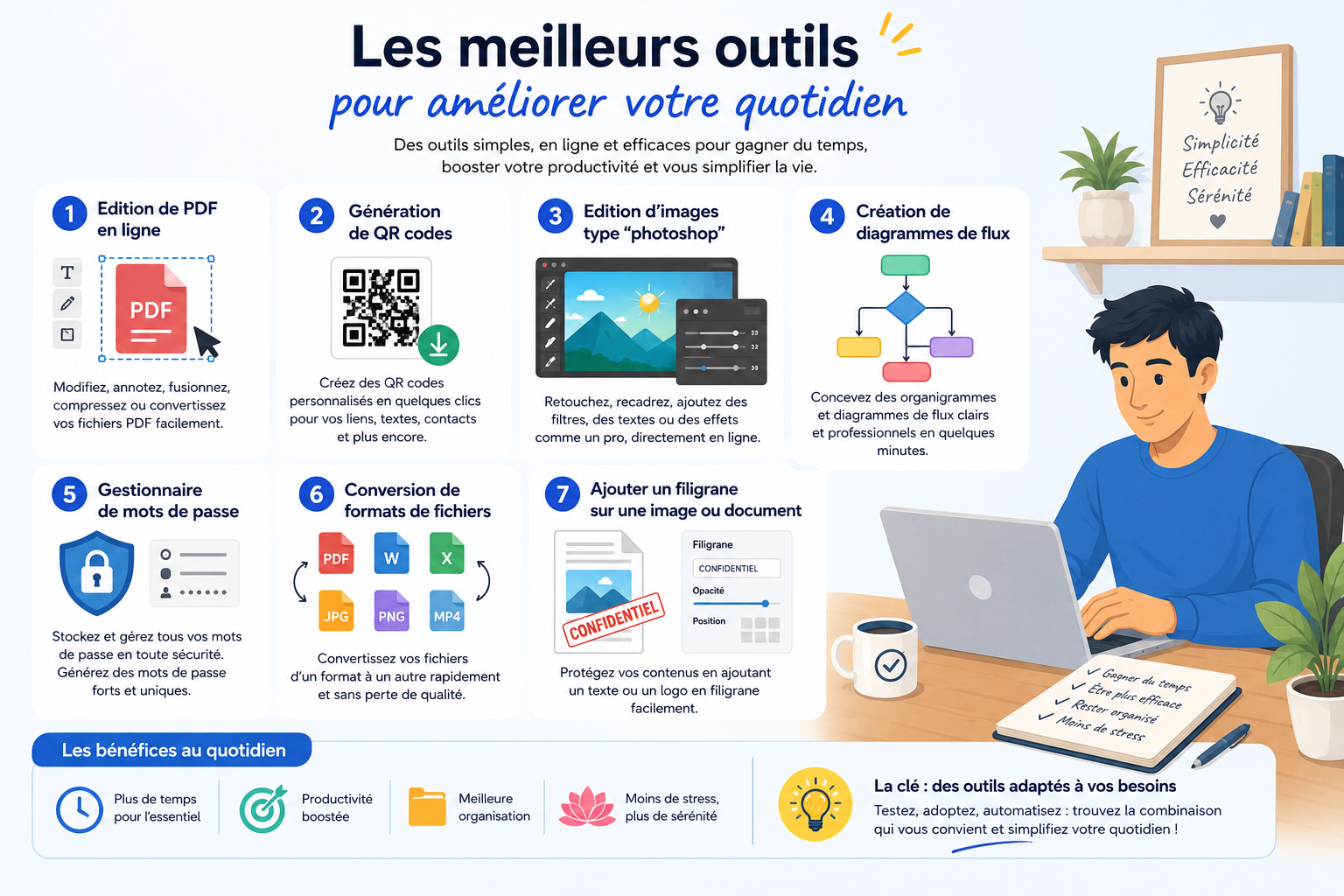
Here is our selection of tools that are easy to use and offer a good range of possibilities.
PDF editing and signing
It’s a question we hear a lot: how do I edit a PDF? SignaturePDF offers a solution that is both easy to use and complete — sign documents, organise pages, edit metadata or efficiently compress large files.
Pros
- Digitally sign and fill in a document, even without form fields
- Tick boxes (quizzes, forms…)
- Easily add a watermark
- Reorder, merge, delete or rotate pages
QR code generator
To create a custom QR code: add Async to your contacts, point to your website or make it easy to join your guest Wi-Fi. The QR codes generated are static and self-contained — they don’t depend on any third-party service.
Pros
- Quick, simple generation
- Plenty of configuration options
- Guaranteed to keep working over time
Cons
- No scan statistics
- No built-in tracking or analytics
Image editing
Photopea is a full-featured alternative to Photoshop, available online with no installation. It supports many formats (PSD, XCF, Sketch, SVG, JPG, PNG) with an interface very close to Photoshop’s.
Pros
- 100% online
- Works with PSD files
- Free for standard use
Cons
- Ads in the free version
- Performance depends on the browser
Flowcharts and diagrams
diagrams.net (draw.io) is a free, open-source alternative to Visio. At Async, we use it to design our infrastructure diagrams and call flows for phone systems.
Pros
- Free, open source, no account needed
- Online or as a desktop app
- Large library of shapes and templates
- Export to PNG, PDF, SVG, XML…
Cons
- Interface can feel busy at first
- Real-time collaboration limited depending on storage
Password manager
KeePassXC lets you create, store and manage all your credentials in a single encrypted file, protected by a master password. Open source and regularly updated, it works entirely offline.
Pros
- Free and open source
- Local storage: no data sent to third parties
- Strong, proven encryption
- Windows, macOS and Linux
Cons
- Access requires the database file
- No built-in sync
File format conversion
Turn an image into an icon, convert audio to another format: vert.sh does it all without sending your files to an external server (except for videos).
Watermark
A tool we built to quickly and simply add a watermark to a document. Everything happens locally in your browser: no data is sent.
Read next
All news →
Chemin de Paudex 5
1132 Lully · Switzerland
 © 2026 ASYNC IT SÀRL — ALL RIGHTS RESERVED